Introduction
Hi friends, greetings. In this era, people are using bikes and cars more and more. Women also use cars, bikes, and shooties to do all their work. Do you need a driving license to drive vehicles?
For that, we can apply using this ‘mParivahan’ app from home.
This app will be very useful for those who drive two-wheelers and four-wheelers. Once you start using this app, you don’t need to carry your RC book or driving license with you everywhere. You can register everything here.
What are the requirements for changing the address and name of our bike? Where is our RTO office? License or model to do that. Fee. This place has been given in this process
Importantly, this application is developed by our government.
App Overview
This mParivahan app is available on both Play Store and APP Store.
Through this process:
- RC
- License
- Challan Services
- RTO office
- Nearby hospital, gas station, petrol pump
This mParivahan app is used by many people such as bike, car, bus, rental vehicle drivers, and non-resident vehicle drivers.
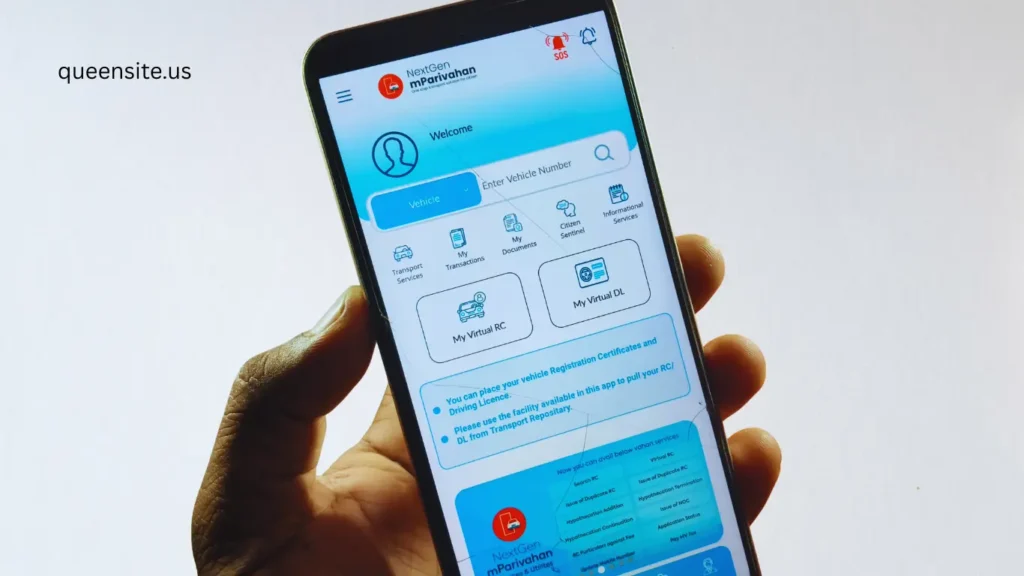
mParivahan App Features.
mParivahan App Highlights
- RC App
- License App
- Information Services
- Nearby
- Insurance
- Vehicle services
- Driving License Services
- Challan Services
- Share RC
- Received RC
How to Download mParivahan
How to download this app
- First open the Google Play Store on your mobile.
- Type mParivahan in the search bar below and search.
- Click on the official app created by the government.
- Now click on the install button.
After the app is installed on your mobile, open the app and give permissions Allow.
Also Read :
How to Register
We need to sign up to use this app.
Sign Account
- Click Sign Up.
- Here you can create your full name,
- mobile number,
- security number
- log in by giving the OTP number.
My Virtual RC
Click on My Virtual RC and anyone in our family can come and give you the RC number and see all the information.
That is, the details of the vehicle –
- Owner name,
- Registering authority,
- When did you get the vehicle,
- When did you register it,
- How much lifetime tax,
- Vehicle class
- All the details will be displayed here.
Add My Vehicle
If you want to add it to your dashboard,
Click on ‘Add to Dashboard’. If you click on it,
Some of your RCs will come and enter the engine number and chassis number.
Then type only the last four digit number here. You have to enter the number and verify it.
Everything will be added to your name. It will come and be saved in this app. You can open it and check it whenever you want.
Virtual RC DL
Next, if you see DL Information. DL Information, then you can collect the information by entering your driving license number.
Now, you can see DL Information. Suppose you are caught by the police, and you do not have a driving license in your hand, then you just need to download this app and install it.
Come and add this to your dashboard, then whenever you open it, it will be displayed for you. Now, click on ‘Add to Dashboard’. If you click on it, it will ask for your date of birth, enter the date of birth. Click on it, click on it, and click on it. Now, the details will be filled in your dashboard. You can open it whenever you want, easy.
Driving License Information
Next, ‘License Information’. DL Information If so, the driving license information guidelines are posted here. You can check all that if you want.
Permanent DL Next Renewal (renewal) – Now how to do the renewal, the information for that has been posted step by step, you can also go and open it and check it.
How to Check Challan Details
Next, you will see ‘Search Challan’. If you have a fine from the traffic authorities for some reason. You have to pay it within a specific date.
Now, if you come and search for the challan, then you can search for your RC number, you can also search for your driving license number. If you have any challan details, it will be displayed here. You can pay and download the bill
Emergency Services
Next, if you see ‘Emergency Services’. Now there is Call Ambulance, you can also call the ambulance.
You can also use this for notifications.
NearBy Services
- Nearest Pollution Checking Center
- Nearest RTO
- Nearest Fuel Pump
- Nearest Hospital
They have also put things like where the nearest is to your location here.
What to do if you do not have a DL?
- If you go during emergency times and do traffic police check, if you do not take a physical copy of your Driving License at that time.
- You can open the mParivahan app and show it.
- You can get DL Details
This should be accepted as per the law.
Pros & Cons
Pros
- Government official application
- RC book and DL can be saved in this application
- You can explore the fine information and see
- There is no charge for this service
Cons
- Internet connection is definitely required If there is no internet, the file cannot be opened
- If the server speed is low, it will not open.
FAQ
Is the mParivahan app secure?
Yes, mParivahan is very secure. This is the official app of the Government of India
Do you need a physical copy of your Driving License?
You can use the DL digital copy in mParivahan App or DigiLocker
Download App
Driving Licence,
Apply link